
Keyword research has a funny way of becoming repetitive.
You start with a perfectly manageable list. Then someone sends another brief. A product team adds twenty new pages. A colleague asks for UK search volumes, CPC data and competition levels. Before long, you are copying keywords between browser tabs, cleaning spreadsheets and repeating the same steps you completed last week.
That is exactly the kind of work we should automate.
In this guide, we are going to look at how you can use the DataForSEO API to automate keyword research. We will also introduce Keyword Workbench, a small local interface that you can download and run on your own computer.
Keyword Workbench gives you a simple place to paste a keyword list, send it to DataForSEO and review the results in a sortable table. There is no cloud account to create for the tool itself, and your DataForSEO credentials stay on your computer.
Let’s get into it.
Why build a local keyword research tool?
There are plenty of excellent SEO platforms available, so building another enormous SEO suite would not be especially useful. That is not what we are doing here.
Keyword Workbench is deliberately focused. It solves one common job:
- Paste a list of keywords.
- Select the market and language.
- Request search-volume data from DataForSEO.
- Review the results.
- Export them as a CSV file.
The value is not that the workflow is complicated. The value is that you no longer need to perform it manually for every brief.
A local tool also gives you a little more control. You can adapt the interface, change the default market, add your own classification rules or connect the results to another internal workflow. Because it runs on your machine, it can remain a lightweight utility instead of becoming another subscription product you need to manage.
Meet Keyword Workbench
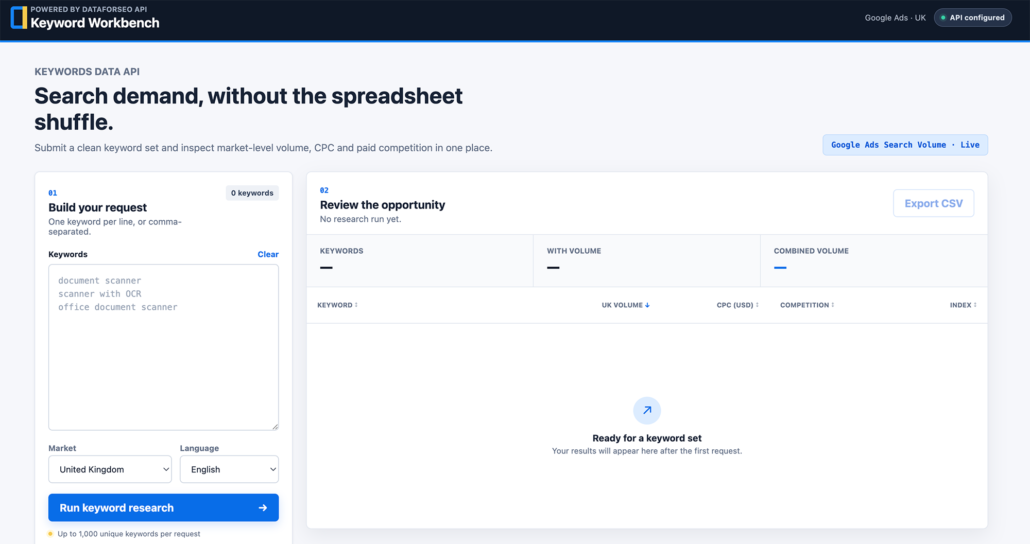
Keyword Workbench is the downloadable interface that accompanies this article. On a Mac or Windows PC, you can start it by double-clicking the included launcher. The tool then opens in your browser and runs locally on your computer.
Or download from my GitHub https://github.com/omisido/dataforseo-keyword-workbench/
The interface includes:
- Bulk keyword input
- Automatic removal of blank lines and duplicates
- Google UK and English targeting by default
- Search volume, CPC and paid competition data
- Sortable result columns
- Clear handling of missing data
- CSV export
- Helpful API, rate-limit and account-credit errors
- Local, server-side credential handling
It accepts keywords separated by new lines or commas. That means you can paste a rough list directly from an SEO brief without carefully reformatting every row first.
For example:
document scanner
office document scanner
scanner with OCR
scanner for invoices
sheet-fed scanner
Keyword Workbench cleans the list, sends one structured request and turns the response into a table you can actually work with.
What you need before you begin
You only need three things:
- A DataForSEO account with API access
- Node.js 20 or newer, which is a free program that runs the local tool
- The downloaded Keyword Workbench project folder
You can find your API login and password in the API Access area of your DataForSEO account. These are API credentials, not necessarily the same details you use for an ordinary website login.
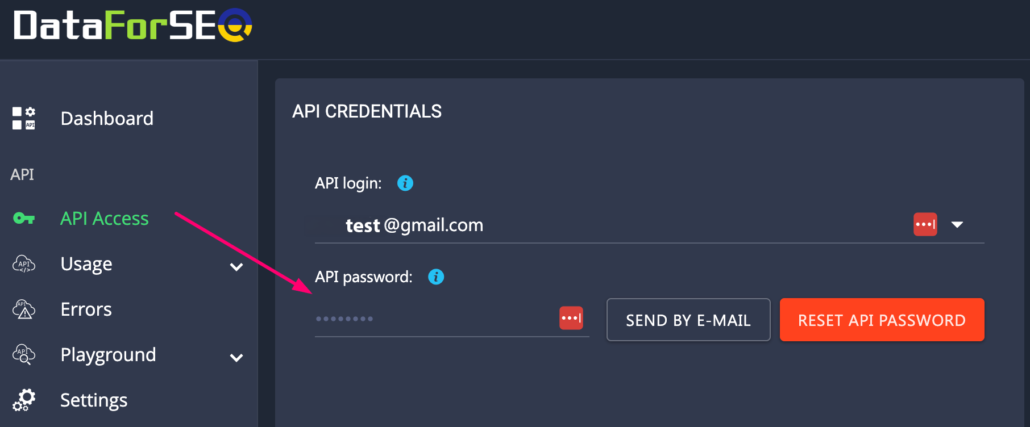
DataForSEO charges for API requests, so it is also worth checking that your account has available credit before you begin.
How the connection works
Keyword Workbench has a small local Node.js server. Your browser sends the keyword list to that local server, and the server sends the authenticated request to DataForSEO.
That server-side step matters.
If the browser contacted DataForSEO directly, your API credentials would need to exist in client-side JavaScript, where they could be exposed. Keyword Workbench keeps them in a local environment file instead. The browser only receives the keyword metrics returned by the local API.
The flow looks like this:
Your browser
    ↓
Keyword Workbench local server
    ↓
DataForSEO API
    ↓
Normalised keyword results
    ↓
Your browser
DataForSEO uses HTTP Basic Authentication over HTTPS. Keyword Workbench constructs that authentication header on the server, sends the request and then translates the API response into a simpler format for the interface.
Setting up Keyword Workbench
After downloading and unzipping the project, use the launcher for your computer:
- On macOS, double-click Start Keyword Workbench.command.
- On Windows, double-click Start Keyword Workbench.bat.
You do not need to type terminal commands. The launcher first checks whether the free software required to run Keyword Workbench is already installed. If it is missing or out of date, the launcher opens the official Node.js download page and explains what to do next.
On the first successful run, the launcher creates a private settings file called .env. It opens the file in TextEdit on macOS or Notepad on Windows. The file contains the configuration values the application expects:
DATAFORSEO_LOGIN=your-api-login
DATAFORSEO_PASSWORD=your-api-password
PORT=4173
Replace the placeholder values with your own DataForSEO API credentials, save the file and double-click the launcher again. It starts the local server and opens Keyword Workbench in your default browser automatically.
Keep the Terminal or Command Prompt window opened by the launcher running while you use the tool. Closing that window stops Keyword Workbench. Nothing remains running permanently in the background.
If macOS blocks the downloaded launcher the first time:
- Click Done, not Move to Bin.
- Open System Settings → Privacy & Security.
- Scroll to Security.
- Click Open Anyway beside the Keyword Workbench message.
- Authenticate and click Open.
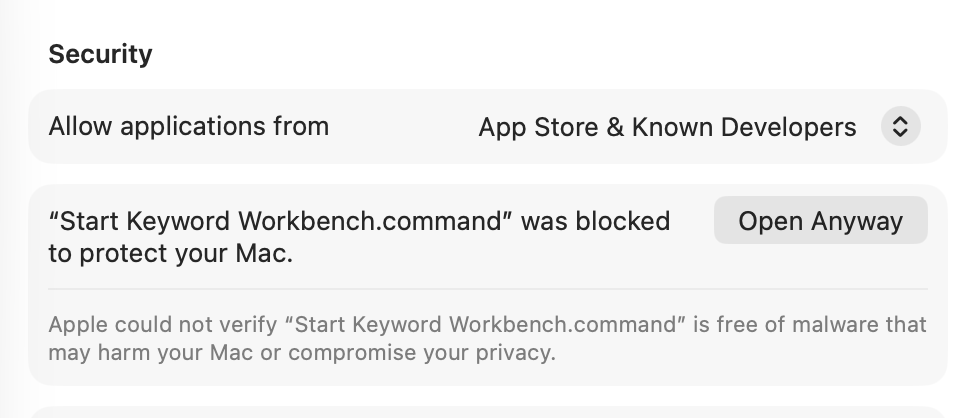
Windows users can run the .bat launcher directly from the unzipped project folder.
The connection badge in the header will tell you whether the local server has found your credentials. If it says API configured, you are ready to run your first request.
Running your first keyword request
Paste your keywords into the input panel. Keyword Workbench will count the unique phrases as you type.
The default settings use:
- Market: United Kingdom
- Language: English
- Data source: Google Ads search-volume data
Click Run keyword research and the local server will submit the request to DataForSEO.
The results table includes:
- Keyword
- Average monthly search volume
- CPC
- Paid-search competition
- Competition index
You can sort any of these columns without making another API request. This is useful when you want to move quickly between the highest-volume phrases, the most commercially competitive terms and keywords with missing data.
When you are finished, select Export CSV to continue working in Excel, Google Sheets or another analysis tool.
What DataForSEO sends back
The Google Ads Search Volume endpoint can provide metrics for up to 1,000 keywords in a request. It can also return monthly search history, bid estimates and competition data. You can review the current request structure and limits in the DataForSEO Search Volume API documentation.
Here is what the main metrics mean in practice.
Search volume
Search volume is an approximate monthly average for the chosen market and language. It is useful for comparing relative demand, but it should not be treated as an exact count of every search performed.
If one phrase has a volume of 2,900 and another has a volume of 20, the first clearly has broader demand. That does not automatically make it the better keyword. The phrase with 20 searches may be much closer to the product, audience or action you care about.
CPC
CPC gives you an indication of how much advertisers have historically paid for a click. A high CPC can suggest commercial value, but it does not guarantee organic conversions.
DataForSEO returns CPC values in US dollars, even when you are researching the UK market.
Competition
The competition level can be low, medium or high. This metric describes competition between paid-search advertisers. It is not an organic keyword-difficulty score.
That distinction is important. A keyword can have high advertising competition while the organic results remain achievable, or the reverse.
Monthly search history
Average volume can hide a lot. Monthly history helps you spot seasonality, sudden demand spikes and declining interest.
Keyword Workbench keeps this history in the normalised API response, which means it can support charts and trend views in a future version without changing the DataForSEO connection.
Cleaning the keyword list before making a request
One of the easiest ways to waste API calls is to send messy input.
Keyword Workbench performs a few useful checks before contacting DataForSEO:
- Leading and trailing spaces are removed.
- Blank rows are ignored.
- Invisible formatting characters are removed.
- Exact duplicates are removed without caring about capitalisation.
- Empty requests are rejected locally.
- Requests containing more than 1,000 unique keywords are rejected.
Imagine that a copied brief contains this:
Document scanner
document scanner

scanner with OCR
The tool sends only two unique keywords. It does not make you pay to research the same phrase twice.
Turning API metrics into SEO decisions
The tool gives you consistent data, but it should not make the final strategic decision for you.
A useful keyword review still asks:
- Does this phrase describe the page accurately?
- What is the search intent?
- Is the user researching, comparing or ready to buy?
- Does another page already target the term?
- Is the keyword commercially relevant?
- What kinds of pages currently rank?
You can use the output to create simple categories such as:
- Primary keyword
- Secondary keyword
- Feature-led keyword
- Use-case keyword
- Informational topic
- Commercial opportunity
- No measurable volume
That turns a raw keyword export into a content plan.
Zero volume does not always mean zero value
Long, specific phrases frequently return no measurable search volume. That does not prove that nobody has ever searched for them. It means the provider does not have measurable data for that exact phrase and targeting combination.
For example, a very specific workflow phrase may have no reported volume, while a shorter related product phrase has clear demand.
The sensible approach is usually to target the broader phrase as the primary keyword and use the more specific language naturally in the page copy.
Keyword Workbench preserves missing values as missing values instead of silently converting everything to zero. That makes the data more honest and helps you distinguish a genuine numeric result from unavailable data.
Dealing with rate limits and account credit
APIs occasionally say no. That is normal.
DataForSEO applies request limits, and live Google Ads endpoints currently allow no more than 12 requests per minute per account. A single request can contain many keywords, so batching is much more efficient than sending one keyword at a time.
Keyword Workbench translates common failures into readable messages, including:
- Credentials were not configured.
- Credentials were rejected.
- The request limit was reached.
- The DataForSEO account needs more credit.
- DataForSEO could not be reached.
- The request timed out.
You can also inspect account usage, balance and rate information through DataForSEO’s User Data endpoint.
Keeping your credentials safe
The local setup is intentionally simple, but a few rules are worth following:
- Never put API credentials in browser JavaScript.
- Never commit the
.envfile to Git. - Do not email or paste credentials into shared documents.
- Rotate credentials if they are exposed.
- Keep the application bound to
127.0.0.1unless you deliberately add authentication for network access.
Keyword Workbench follows these principles by keeping credentials in the Node.js process and returning only a safe configuration status to the browser.
Making the tool your own
The current version is intentionally small, which makes it a good starting point for experimentation.
You could extend it with:
- Additional countries and languages
- Keyword suggestions
- Live SERP results
- Ranking URL checks
- Search-intent classification
- Monthly trend charts
- Saved research projects
- Google Search Console data
- Competitor-domain analysis
- Direct Google Sheets export
Because the DataForSEO integration is kept behind a small server-side module, you can add features without exposing the authentication logic throughout the application.
Why this approach works
The real benefit of automation is not simply speed. It is consistency.
Every keyword is cleaned in the same way. Every request uses explicit market targeting. Missing values are handled predictably. Errors are visible. Results follow the same structure every time.
That gives you a much stronger foundation for SEO decisions than a collection of manually assembled spreadsheets.
Keyword Workbench will not replace strategic thinking, and it is not trying to. It removes the repetitive API work so you can spend more time deciding what the data means and what to do next.
Download the project, connect your DataForSEO credentials and try it with your next keyword brief. Once you have a local research workflow that takes seconds instead of half an hour, it is surprisingly difficult to go back.
FAQ
Keyword Workbench retrieves keyword metrics through DataForSEO’s Google Ads API. The results include estimated average monthly search volume, CPC and paid-search competition for the selected market and language.
DataForSEO provides APIs for building SEO and marketing tools. Beyond keyword research, it can supply SERP results, backlink data, on-page analysis, search trends, competitor insights, business listings, reviews and e-commerce data.
No. Download and unzip the project, then use the included macOS or Windows launcher. It guides you through adding your DataForSEO credentials and opens the tool in your browser.
Your credentials remain in a local .env file and are used only by the local Node.js server. They are never added to browser code, exported CSV files or the GitHub repository.
DataForSEO provides search volume, CPC, paid competition and historical monthly data for keywords across different countries and languages. Keyword Workbench makes this data easier to request, review, sort and export.